OnlyFans auto reply messages: what's allowed in 2026
OnlyFans auto reply messages are allowed when they sound like you and run safely. Here is what's permitted, what gets accounts banned, and 9 examples to copy.
OnlyFans auto reply messages are allowed, and most full-time creators already use them. Welcome messages, timed follow-ups, PPV drops, and mass messages are built into how the platform works. What gets accounts in trouble is narrower than the panic suggests: handing your login to a cloud chatting service that signs in as you, blasting robotic text that sounds nothing like you, and, as of 2026, using AI to reply without disclosing it. Set those three up right and auto replies are one of the safest moves you can make.
This guide covers what the platform actually permits, nine example auto replies you can adapt, an allowed-versus-risky table, and how to run the whole thing from your own machine so no stranger ever holds your password.
Are OnlyFans auto reply messages allowed?
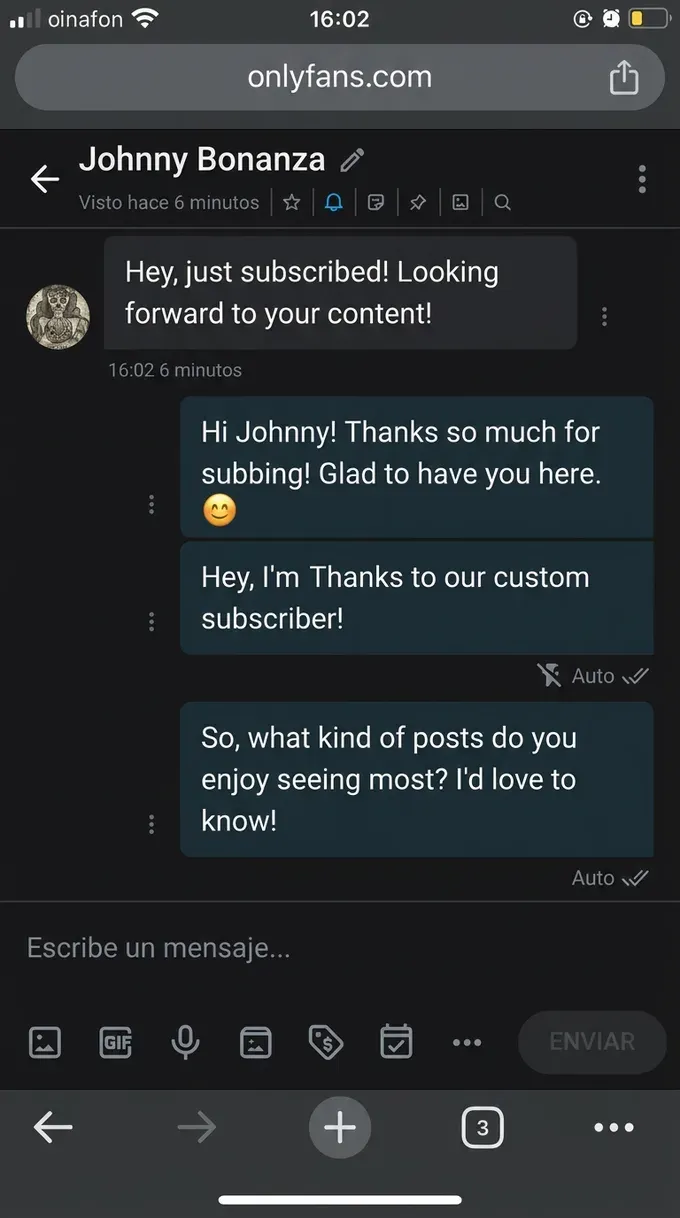
Yes. Auto replies are permitted and widespread. The platform ships a native welcome message for new subscribers, native mass messaging to your full list or a segment, and scheduled sends. Most top earners use some form of inbox automation, and they are not hiding it. Automation is simply how an inbox gets managed once you pass a few hundred active fans.
The grey area is not the act of automating. It is who runs the automation and how human it feels. Two rules carry the real weight. First, OnlyFans does not want third parties logging in as you, which is why credential-sharing is the single biggest account risk in this whole space. Second, as of 2026 the platform expects disclosure when a reply is generated by an AI model rather than written by you.
So the honest framing is not "auto replies are risky." It is "a few specific ways of running them are risky, and every one of them is avoidable."
It helps to separate two things people lump together. A scheduled or triggered message you wrote is closer to an out-of-office reply. An AI model generating fresh text on its own is a different category with its own disclosure rule. Most of the revenue from auto replies comes from the first kind, the flows you author once and reuse. You do not need the second kind to buy back your mornings.
What auto reply messages should you set up first?
Start where the return is highest and the risk is lowest. You do not need ten flows. You need four, in order, each written in your own words and sent at a natural moment instead of the instant a fan blinks.
- The welcome reply. Greet every new subscriber the moment they join, in your voice, with one soft next step. New subs are warmest in the first few minutes, and the native welcome message is the easiest revenue you are leaving on the table if it is blank.
- The same-day follow-up. One timed message to anyone who opened but did not buy. Most sales happen after the first message, not during it, so a single follow-up recovers conversations that would otherwise die overnight.
- The PPV drop. A scheduled mass message to a segment when you post something new, with a teaser and a price. One or two preview images can lift unlock rate noticeably, so lead with the visual, not the link.
- The re-engagement nudge. A scheduled note to fans who have gone quiet for a set number of days. Lapsed fans rarely return on their own, and an on-voice nudge brings back a measurable share without you tracking anyone by hand.
Set those four up once and the morning catch-up shrinks from two hours to fifteen minutes. That is the realistic version of auto replies. Not a bot pretending to be you, but your own playbook running while you film or sleep.
Example OnlyFans auto replies that still feel human
The script does more work than the automation. A generic "hey babe, thanks for subscribing 😘" sent to ten thousand people reads exactly like what it is. Below are nine starting points. Rewrite each one in your actual wording, your emojis, your pacing. They are templates, not a finished voice.
Welcome replies
- "hey, so glad you're here 🙌 i actually read my messages, so tell me, what made you finally hit subscribe?"
- "welcome in! i drop new stuff a few times a week and i love a good chat. what kind of content are you here for?"
- "you're in 🔥 quick heads up, the spicier stuff lives in my messages, not the feed. want me to send you what's new?"
Follow-up replies
- "saw you peeked at my last set 👀 it's still unlocked at a soft price for new subs if you want it"
- "no pressure at all, just checking you found everything okay. anything you've been wanting to see more of?"
- "i held one back from the last drop because it was a little too much for the feed 🙈 want first look?"
Re-engagement replies
- "hey stranger, you went quiet on me 🥲 i've got a whole new vibe going lately. miss having you around"
- "been a minute! i saved something i think is exactly your taste. want me to send it over?"
- "checking in, no agenda. how've you been? i actually notice when my regulars disappear"
Notice what these do. They ask a question, they reference something specific, and they sound like a person on a good day. The fastest way to make an auto reply convert is to write it the way you would text a regular, then let the tool send it for you.
A few habits keep the swipe file from going stale. Rotate two or three versions of each flow so the same opener does not hit your whole list verbatim, which is both better for conversion and quieter to the spam filters. Mirror your own typos and lowercase style if that is how you really write, because polish is a tell. And leave one genuine blank in the welcome, a question only you would ask, so the conversation has somewhere to go after the fan replies.
Which auto replies are safe and which get you banned?
Most ban stories trace back to a handful of behaviors that have nothing to do with automation. The table below sorts the common setups so you can copy the safe column and avoid the rest.
| Auto reply setup | Status | Why |
|---|---|---|
| Native welcome message in your own words | Allowed | Built into the platform, sent to every new sub |
| Timed follow-up and scheduled PPV drop | Allowed | Standard scheduled messaging, used at every level |
| Mass message to a segment of your list | Allowed | Native feature; supported and common |
| AI-drafted reply, disclosed, human-approved | Allowed | The 2026-compliant "co-pilot" pattern |
| Fully autonomous AI reply, undisclosed | Risky | Disclosure is expected as of 2026; sits in a grey zone |
| Cloud chatter logging in with your password | High risk | Credential-sharing is the top account risk in the space |
| Auto reply pushing an external payment link | Banned | Off-platform payment terms are keyword-watched |
| Identical message blasted at spam volume | Risky | Triggers spam filters and pattern detection |
The pattern is clear. The platform is not hunting automation. It is hunting account takeovers, off-platform leakage, and spam. Keep your login on your own device, keep payments on OnlyFans, write in your own voice, and disclose AI. Do that and an auto reply is about as risky as scheduling a post.
One more practical note: OnlyFans filters certain words inside messages, especially terms that point fans toward outside payment apps or other platforms. If a flow stops delivering, check it for restricted words before you blame the automation.
Do you have to tell fans your replies are automated?
For AI-generated replies, yes. As of 2026 OnlyFans expects creators to disclose when a model wrote the message, and a short profile note or a consistent footer covers it. The disclosure is about AI authorship, not about the fact that a message was scheduled. Fans are far less bothered by this than creators fear. What burns trust is feeling deceived, not feeling assisted.
For pre-written flows you authored yourself, the situation is closer to a scheduled text. You wrote it, you approved it, it sounds like you. There is no universal obligation to flag that a message was queued. Setting honest expectations about your response time is still good practice. A fan who knows you reply within a day has a better experience than one who expects instant replies and gets silence.
The creators who lose fans over automation are the ones caught using a generic script that clearly went to a thousand people. Not the ones who said, plainly, "I use some automation to keep up with my inbox."
How to run auto replies without handing over your login
Here is the part the cloud tools cannot say. Every popular OnlyFans chatting service (the well-known CRMs and AI chatters) is a cloud product that asks for your OnlyFans login and then reads your fan messages on its own servers. That means a company you have never met holds your credentials, sees every conversation, and knows your earnings. If their servers get flagged, your account inherits the suspicion. If they get breached, your login is part of the leak. And the exposure is yours by design: OnlyFans makes the creator legally responsible for every transaction with a subscriber, so a chatter's mistake lands on your account, not theirs.
The safer pattern runs the automation on your own machine. When the work happens locally, your login never leaves your laptop and no outside party can act as you. That is the whole idea behind FanClaw: a local-first app that runs your DMs, posting, acquisition, and monetization from your own computer, where your fan data never leaves your device. It writes auto replies in your own voice, keeps a human approval step for anything sensitive, and never asks you to surrender your password to a server somewhere.
To set it up cleanly:
- Keep the login on your device. Choose automation that runs locally over a cloud service you sign into. This is the single biggest difference between a setup that scales safely and one that puts your account at someone else's mercy.
- Write every flow yourself. Build your welcome, follow-up, PPV, and re-engagement messages in your real words. The goal is not to manufacture a persona. It is to send your actual voice while you are away from the keyboard.
- Keep a human on the money. Custom requests, upset fans, anything involving a real purchase: those deserve a read. Let the predictable flows run themselves and reserve your attention for the conversations that earn.
That is sustainable auto replies in 2026. You can download FanClaw and run a full first night locally before you commit to anything, or read the deeper playbook on how creators automate their OnlyFans DMs without getting banned. Either way, the principle holds: your voice, your login, your machine.
Frequently asked questions
Yes. Welcome messages to new subscribers, timed follow-ups, and mass messages are standard tools the platform supports natively. The lines you cannot cross are narrow: do not hand your login to a cloud tool that signs in as you, and as of 2026 disclose when a reply is written by AI rather than by you.
The platform watches for spam signals, not automation itself. Identical messages blasted at high volume, replies that fire in seconds at 4am, and external payment keywords are what get flagged. An auto reply that waits a natural beat and uses your own wording does not stand out.
They respond when the message reads like you and gives them a reason to reply. A generic 'hey babe' opener sent to everyone converts poorly. A welcome that references the content they just unlocked, in your voice, with a soft next step, performs much better. The script quality matters more than the automation.
If an AI model writes the reply, yes, OnlyFans expects disclosure as of 2026. Pre-written flows you authored yourself are treated like scheduled messages and do not require a disclaimer. Being upfront about response times never hurts trust, and fans mind feeling deceived far more than feeling assisted.
OnlyFans has a native welcome message you set in your messaging settings, sent automatically to every new subscriber. For follow-ups, PPV drops, and re-engagement, you either schedule mass messages by hand or use a tool that fires them on triggers like a new sub, a tip, or an unlock.
Not the auto replies themselves. Accounts get banned for the things around them: credential-sharing with a cloud chatter, undisclosed AI, pushing fans to external payment links, and spam-volume identical blasts. Authentic, disclosed, on-device automation is low risk.
An auto reply is a message that fires on a trigger, like a welcome or a follow-up, in your own wording. A chatter is a person, often an agency hire, who logs into your account and answers fans as you. Auto replies keep your voice and your login. Chatters cost 20 percent or more and hand a stranger your inbox.