OnlyFans tip menu: ideas, examples & pricing (2026)
How to build an OnlyFans tip menu that sells: what to include, how to price each item, copy-paste examples, and where to post it so fans actually use it.
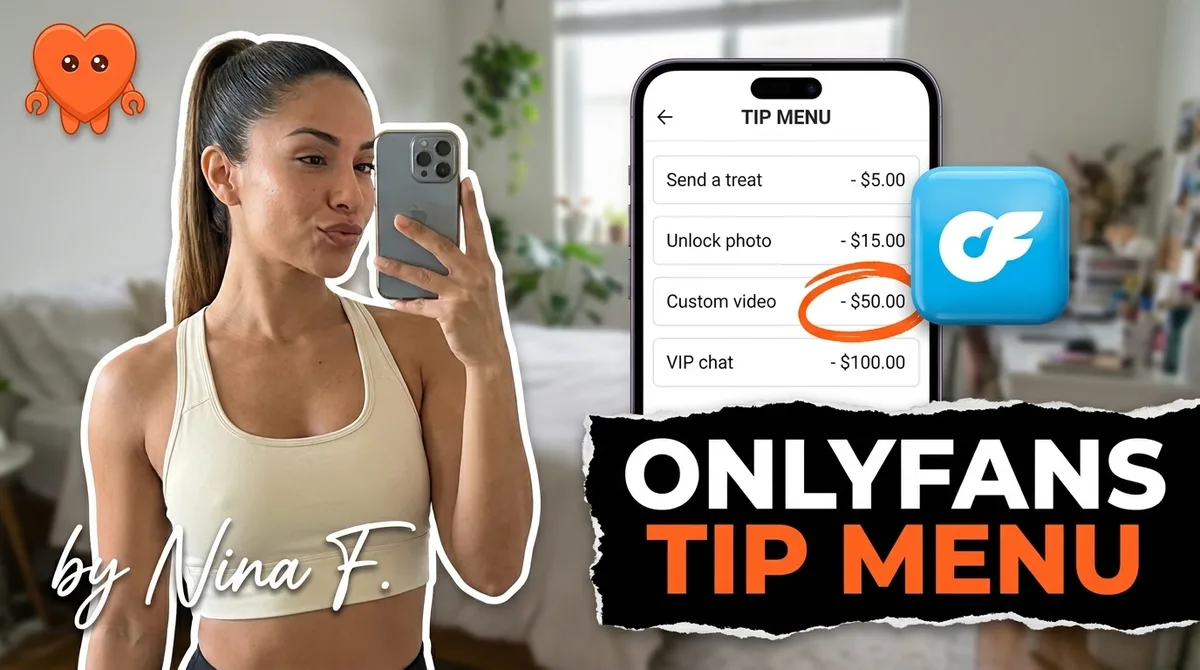
An OnlyFans tip menu, often just called an OnlyFans menu, is a pinned price list that tells fans exactly what each tip amount unlocks. It works because it removes the negotiation step: the fan does not have to ask, you do not have to quote, and the purchase happens faster. A well-built menu covers items across a value ladder from low-friction entry points ($10 to $20) to premium custom work ($100 and up), accounts for OnlyFans' 20 percent cut in every price, and lives somewhere visible enough that fans encounter it without searching for it.
This guide covers what to put on the menu, how to price it, copy-paste examples you can edit today, and the one upgrade that makes a flat menu perform far better.
Why a tip menu reduces friction and increases revenue
A tip menu works because it shifts the conversation from negotiation to selection. Without one, a fan who wants something specific has to ask, wait for your reply, hear a price, decide, and then act. That is four steps where the intent can cool. With a menu, the fan sees the price, sends the tip, and the transaction closes in one move.
Two things make a menu earn rather than sit:
- It anchors the room. A fan who sees a $120 custom video slot does not think "that is expensive." He thinks "I could start with the $25 set." Your entry-level item looks reasonable next to the premium tier. Without anchoring, a $25 request can feel arbitrary.
- It signals professionalism. A menu tells fans this is a real business with real prices. Creators who operate without one often get lowball requests because there is no price floor visible. A clear menu closes that gap.
One number to keep front of mind throughout: OnlyFans takes 20 percent of every tip, so you keep 80 percent. A $50 tip puts $40 in your account. Price every menu item to your desired net, not your desired gross.
What to include in your OnlyFans tip menu
A strong menu has 6 to 10 items arranged from lowest to highest price. Fewer than 6 feels thin. More than 10 is hard to read on a phone and creates decision paralysis.
Low-friction entry items ($10 to $30)
These exist to get the fan to tip at all. Once they have tipped once, subsequent tips require far less activation energy.
- Shoutout in a post or story ($10 to $15): easy to deliver, personal for the fan, costs you minutes.
- Rate my DM / rate my photos ($10 to $20): fans send you something, you respond. High demand, low effort.
- Custom photo set, 10 photos ($20 to $30): specific to the fan's request, delivered in the DM thread.
- Early access to upcoming content ($15 to $25): sends a piece of content 24 to 48 hours before public release.
Mid-tier items ($35 to $75)
This range is where most of your volume lands once a menu is established.
- Custom video, 3 to 5 minutes ($35 to $50): a solo video made to the fan's prompt. Rough benchmark: $3 to $5 per minute of finished video, but custom adds a premium.
- Themed or costume content ($45 to $70): a specific outfit, setting, or scenario the fan requests. Effort justifies the step up.
- Behind-the-scenes set ($35 to $55): a less polished, more intimate set that feels personal. Low production overhead.
Premium and custom items ($75 and up)
Reserve this tier for work that genuinely costs you time or creative energy.
- Custom long video, 10 to 15 minutes ($75 to $120): price by minute. A 12-minute custom at $4/min nets you roughly $38 after the platform cut on a $50 ticket. At $100 you net $80. Price accordingly.
- Full custom experience ($150 and up): bundled content plus a dedicated DM exchange, delivered over 24 to 48 hours. Your highest-paying fans will find this tier.
- Open custom request (price on request): a catch-all for fans who want something not on the menu. Keeps the menu clean while signaling that negotiation is possible.
How to price each item (accounting for the 20 percent cut)
The math is simple but easy to skip. Every price on your menu is a gross figure. To get the net you want, divide by 0.8.
| What you want to net | Menu price to set |
|---|---|
| $10 | $12.50 |
| $20 | $25 |
| $30 | $37.50 |
| $40 | $50 |
| $60 | $75 |
| $80 | $100 |
| $120 | $150 |
Round to clean numbers. $37.50 looks odd. Post it at $35 (nets you $28) or $40 (nets you $32) depending on what the item is worth to you.
A few pricing principles that hold across thousands of menus:
- Keep the gap between consecutive tiers meaningful. A ladder of $10, $12, $15 gives fans nowhere to climb. $10, $25, $50, $100 gives them four clear choices.
- Price custom higher than templated. A video you film once and sell repeatedly is worth less per copy than a video you film only for one fan.
- Revisit prices every 60 to 90 days. If your lowest tier sells out instantly and your highest never moves, you have room to shift both.
Copy-paste tip menu examples
Both examples are SFW in wording so they can be pinned publicly.
Starter menu (5 items)
TIP MENU

$15 - Shoutout in my next post (tag you or keep it anon)
$25 - Custom photo set (10 photos, your theme)
$50 - Custom solo video (5 min, your idea)
$100 - Full custom experience (content + exclusive DM chat, 24h)
$5 - Just because (always appreciated)

DM me after your tip so I know what you want.
Full menu (9 items)
TIP MENU

$10 - Rate your DM / photos (honest feedback)
$15 - Shoutout in a post (name or anon, your choice)
$20 - Early access to this week's new set (before everyone else)
$25 - Custom photo set, 10 photos (your theme)
$40 - Behind-the-scenes set (unfiltered, just for you)
$60 - Themed/costume content (specific outfit or scenario)
$50 - Custom video, 5 min (your idea, your rules)
$100 - Custom video, 10 min
$150 - Full custom experience (video + extended DM chat, 48h)

DM me after tipping with your request. I confirm before I start.
Feel free to adjust the items, prices, and closing line to match your voice. The structure (low to high, clear deliverable, one-line call to action at the end) is what matters.
Where and how to post your tip menu
A menu no one sees does not convert. The goal is to put it in front of fans at the three moments they are most likely to act: when they first subscribe, when they are browsing your profile, and when you are promoting new content.
Pin it to your wall. A pinned post is the first thing a new subscriber sees after your bio. Write the menu as a post, pin it, and keep it there. Refresh the post (unpin, re-post, re-pin) every four to six weeks so it appears at the top of the feed again for returning fans.
Include it in your welcome DM. New subscribers are warmest in the first few minutes. A welcome message that greets them and points to the menu converts that warm window into action. If you want to know more about building that welcome flow, the piece on automating OnlyFans DMs safely covers the setup in detail.
Reference specific items in your content. Instead of posting "tip menu in my bio," say: "filming my $50 custom video for a fan this afternoon, slot open if anyone wants one this week." Specific items feel like real offers, not generic price sheets.
Add a one-liner to your bio. "Custom content available, check pinned post" is enough. It signals the menu exists without forcing your full bio to double as a price list.
Why flat pricing leaves money on the table (and what to do instead)
A single menu served to every fan is a starting point, not a ceiling. The fan who has spent $400 over three months does not need the same $25 entry-level offer as a fan who joined last week. Sending the same menu to both is the easiest money left uncaptured in most accounts.
The upgrade is pricing per fan based on what you know about them: how much they have spent, how often they engage, what they have unlocked before. A fan with a strong spend history who has never received a custom offer at the $75 tier is a soft target. A brand-new subscriber who has not tipped once is not.
In practice, this looks like a follow-up DM after the standard menu, personalised to the fan's tier. "Noticed you unlocked the photo set last month, I have a custom video slot open this week at $75 if you want something made just for you." That message converts at a higher rate than a menu blast, and it costs you nothing if the right fan data is in front of you.
For a deeper look at how to structure the value ladder itself, see OnlyFans PPV pricing. For the fan-level personalisation layer, that is what FanClaw is built for. The agent reads your fan spend history on your own machine, surfaces the fans most likely to respond to a specific offer, and drafts the follow-up in your voice. You approve before anything sends. You can download FanClaw and run it locally with no data leaving your machine.
Frequently asked questions
An OnlyFans tip menu, which fans often just call an OnlyFans menu, is a public price list, usually pinned to your profile or posted as a sticky DM, that tells fans exactly what each tip amount unlocks. It removes guesswork on both sides: the fan knows what to send, and you know what they are asking for without a back-and-forth negotiation.
Price each item at what you want to net after OnlyFans takes 20 percent. For a $25 photo set, set the menu price at $31 to clear $25. Keep entry-level items at $10 to $20 to lower friction, and reserve premium slots ($75 and up) for custom or high-effort deliverables. The right ladder converts; the wrong one stalls.
Standard items include: shoutout, custom photo set, custom video, solo video by length, themed or costume content, rate my DM, and early access to new content. Add a 'custom request' catch-all at the top of the price range. Keep it to 6 to 10 items so the menu is readable on a phone.
Pin it as a post on your profile wall so every new subscriber sees it. Also send it as a welcome DM to new fans so it reaches them immediately. Some creators include a one-line summary in their bio and link back to the pinned post.
Yes, for two reasons. First, they remove negotiation: the fan does not have to ask what a custom costs, so the friction of asking disappears. Second, they anchor expectations upward. A fan who sees a $100 custom slot often starts at a lower tier rather than at zero.
You can, and top earners do. The one-size menu leaves money on the table with high-spending fans who would pay multiples of your standard rate. The practical way to run variable pricing is to use your fan spend history to send personalised follow-ups after the menu, suggesting the tier most likely to convert for each fan.
Keep the written menu SFW so it can be pinned publicly without triggering content flags. Explicit items can be described with neutral language ('themed video', 'custom solo set'). Fans understand what that means. Anything genuinely custom can be discussed in DMs after they reach out.
Post it, but also reference it actively. Mention it in your welcome DM, link it in re-engagement messages, and name specific items when you are hinting at new content ('menu item 5 goes live Friday'). A menu no one sees does not convert. Consistent, low-pressure visibility is what moves it.