

OnlyFans CRM: what it does and how to run one (2026)
An OnlyFans CRM tracks each fan's spend, activity and preferences so you know who to message and what to offer. How to run one, even in a spreadsheet.
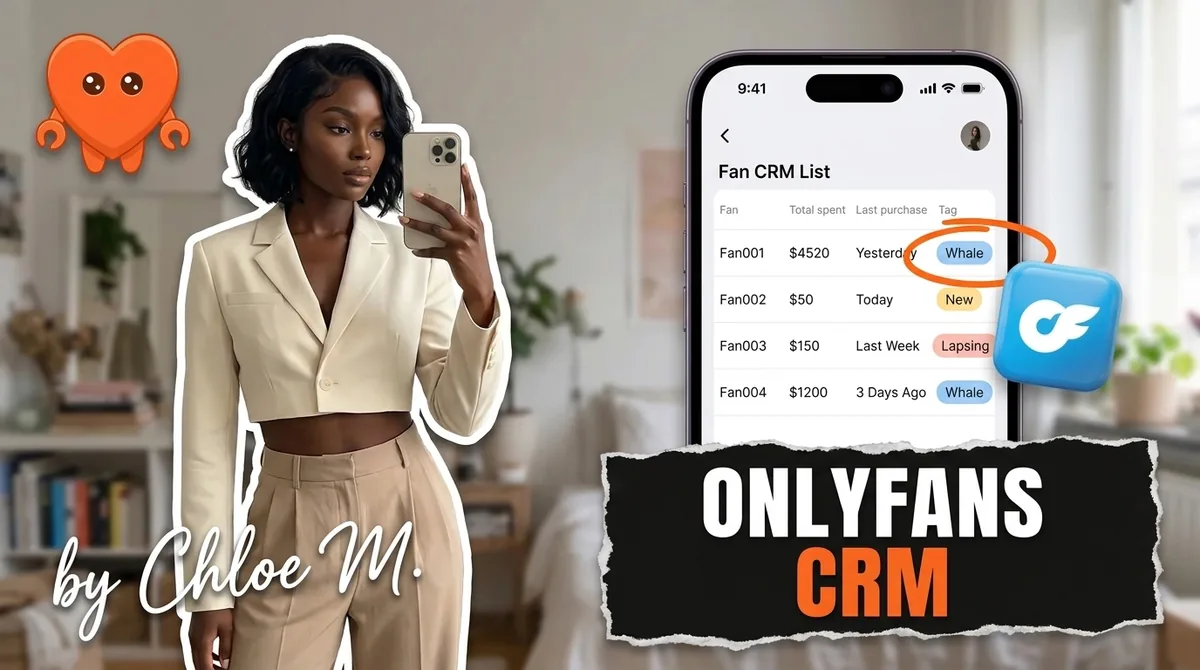
An OnlyFans CRM is a system that keeps a record of every fan (what they spent, what they bought, when they last replied, what they like) so you can decide who to message, what to offer, and when. It can be dedicated software or a spreadsheet. What makes it a CRM is not the tool. It is that every mass message, PPV price, and win-back starts from that record instead of from memory.
This guide covers what a fan CRM actually does, how to run one yourself, and the point where software starts to beat a spreadsheet. If you already know you want software and are comparing the full market, our best OnlyFans management software guide covers every category of tool.
What is an OnlyFans CRM, and does OnlyFans have one?
A fan CRM turns scattered signals into one line per fan. OnlyFans gives you some of those signals natively, but not the layer that connects them. Knowing exactly what the platform provides tells you what your CRM needs to add.
Out of the box, OnlyFans gives creators:
- Lists. Built-in lists such as Fans, Following, Renew On, and Renew Off, plus custom lists you create.
- Per-fan spend. You can see how much each fan has spent on your page, a running total and not only single purchases. We break that down in what OnlyFans creators can see.
- List targeting. Mass messages can include or exclude specific lists.
What it does not give you is judgment. Nothing tells you that a fan who spent $300 last month has not opened a message in 19 days, or that another fan only ever buys a certain type of set. That connective layer is the CRM.
The simplest definition: OnlyFans stores transactions. A CRM stores relationships. Revenue comes from acting on the second.
What a fan CRM actually does
Every OnlyFans CRM, from a free spreadsheet to agency software billed per account, does the same core jobs. The difference is how much of the upkeep it does for you, and where it keeps the data.
Fan tagging and notes
Tags put each fan in a bucket you can act on. Notes remember what a tag cannot. Common tags creators use:
- Tier: whale, regular buyer, occasional, subscription only.
- Status: new (first 7 days), active, cooling, lapsed.
- Preference: the content types they buy or ask about.
- Handling: personal reply only, no discounts, sensitive topic.
Notes carry the context a fan expects you to remember: a request they made, something they said no to, their time zone. A fan who mentioned a trip last week and hears "how was it?" feels known. That feeling is what renews subscriptions.
Keep notes to what fans choose to share with you. Never try to work out a fan's real-world identity. A CRM is for relevance and respect, not surveillance.
Spend history and whale detection
Spend is the most important field in any fan CRM. Track at least three numbers per fan: total spend, last purchase date, and the size of their typical purchase.
Those three numbers detect the fans that matter most:
- Whales: top total spend. They deserve personal replies, first access, and offers priced for them, not for your average fan.
- Rising fans: recent purchases getting larger. Often next month's whales.
- Cooling whales: high total spend, but no purchase in two or three weeks. This is the most expensive fan to lose quietly.
Typical purchase size also guides PPV pricing. A fan who reliably unlocks $25 sets is a natural candidate for a $45 offer, not a $120 one. A value ladder that climbs gently, for example $15, $25, $45, $70, $120, converts better than jumping to the top.
Segments for mass messages and re-engagement lists
Tags and spend become segments, and segments decide who receives what. Instead of one message to everyone, you send the premium offer to whales, a mid-priced set to active buyers, and a warm check-in to fans who went quiet.
Re-engagement lists are where a CRM pays for itself fastest. Filter for fans with no reply and no purchase in a set window (many creators use two to four weeks) and send one short, on-style note. Lapsed fans rarely come back on their own.
We cover segment sizes, pricing, and send cadence in our OnlyFans mass message strategy guide. The CRM is simply what keeps those segments accurate.
How to run an OnlyFans CRM in a spreadsheet
A spreadsheet is a real CRM if you keep it current. It costs nothing, teaches you what data matters, and makes it obvious later which software features you need. Set it up in an afternoon.
The columns to use:
| Column | Example | What it drives |
|---|---|---|
| Username | @fan_handle | The key for every other field |
| Platform | OnlyFans, Fansly | Where to message them |
| Subscribed since | 2026-03-14 | New-fan welcome and loyalty offers |
| Renewal | On / Off | Win-back before the sub expires |
| Total spend | $640 | Tier tag and whale detection |
| Last purchase | 2026-09-02 | Cooling-fan alerts |
| Typical purchase | $25 | PPV price for this fan |
| Last reply | 2026-09-10 | Re-engagement list |
| Tier tag | Whale | Which segment they get |
| Notes | Asked for more behind-the-scenes sets | Personal replies and offers |
The routine that keeps it useful:
- Seed it from OnlyFans. Start with your top spenders and anyone on the Renew Off list. You do not need every subscriber on day one.
- Update spend after each sales day, or at least weekly before you plan a mass message.
- Sort by last purchase every week and flag any high-spend fan who has gone quiet.
- Rebuild your OnlyFans lists from the sheet (whales, active, lapsed) so mass messages target the right people.
- Review tags every two weeks. Fans move between tiers, and stale tags send the wrong offer.
- Protect the file. It holds your fans' usernames and spending. Keep it private, turn on two-step verification wherever it is stored, and never share an edit link.
The honest downside is that this is manual data entry, done by the same person who films, posts, and answers DMs. Which is the whole question of the next section.
When CRM software beats a spreadsheet
Software beats a spreadsheet once keeping the sheet current costs more time than the decisions it improves. There is no magic subscriber count. There are clear signs.
- You update it less than weekly. A CRM with stale spend data sends whale offers to fans who stopped buying and misses the ones who just started.
- You run more than one platform. A fan who follows you on Reddit, subscribes on Fansly, and tips on OnlyFans is three rows in three places by hand.
- Fans message across time zones. A cooling whale who replies at 3am needs a relevant answer before morning, not after you check a sheet.
- You catch lapses too late. If you keep noticing a top fan went quiet a month ago, your review cycle is too slow.
- Notes live in your head. When context only exists in your memory, a busy week wipes it.
What good software adds is automation of the upkeep: spend and activity fields that update on their own, segments that refresh as fans move, and alerts when a valuable fan cools. The best tools also use the record directly, pricing an offer from a fan's history or drafting a follow-up that references what they bought.
Before you pick any CRM software, ask four questions that feature pages rarely answer:
- Can I export my fan records if I leave? Tags, notes, and spend history you built should stay yours.
- Does it cover every platform I sell on? A CRM that only sees OnlyFans misses the Fansly buyer and the Reddit follower who became both.
- Does the price rise with my earnings? Tiered pricing turns a good month into a bigger software bill.
- Who else can read my notes? Team roles, vendor support staff, and connected sessions all widen that circle.
OnlyFans CRM software compared
Here is a short view of the tools creators and agencies use as a CRM, as of September 2026, from each company's pricing page. For the full comparison by creator stage, see the best OnlyFans management software guide.
| Tool | 2026 pricing | CRM strengths | Built for | Where fan data lives |
|---|---|---|---|---|
| Spreadsheet | Free | Fully custom fields and notes | Small solo pages | Wherever you store the file |
| Supercreator | Free CRM Lite (up to 10 accounts); $15 per account Premium | Fan CRM with an AI chatting upgrade | Teams and agencies | Vendor's connected session and apps |
| Infloww | From $40 per creator profile, tiered by earnings | Smart Lists, Smart Messages, fan insights | Agencies with chatter teams | Shared via Infloww proxy and team roles |
| FansMetric | $39 per account (Standard); $99 (Pro) | Fan lists grouped by spend, analytics | Analytics-first operators | Vendor's connected session |
| CreatorHero | $39.99 base plus success fee capped at $260 | Fan management, expiring-sub alerts | Agency owners | Vendor's connected session |
| FanClaw | $49 per month flat, 7-day free trial | Per-fan memory and spend used to draft replies and price offers | Solo creators | Your own machine |
Two things this table makes visible. First, most CRM software is priced per account, and several vendors raise the price as your earnings grow. Second, almost every option keeps your fan list inside a vendor's system.
That second point deserves weight. Your fan list, with usernames, spend, and private notes, is the most sensitive data your business owns. It is also the asset an agency or tool can hold onto when you leave.
FanClaw is a local-first app that runs a creator's DMs, posting, acquisition, and monetization from her own machine. Its fan memory works like a CRM that updates itself: spend, purchases, replies, and preferences are recorded as the agent works your inboxes, stored on your laptop, and used to draft messages in your own editorial style and to time and price offers. You approve anything that matters. It covers OnlyFans, Fansly, Instagram, X, TikTok, Reddit, and Telegram, so one fan across platforms is one record.
Start with a spreadsheet if your page is small; it will teach you what you need. When the upkeep starts costing you sales, compare the options on FanClaw pricing and choose the tool that keeps your most valuable data where you can see it.
Frequently asked questions
An OnlyFans CRM (customer relationship management) is a system that keeps a record of each fan: what they spent, what they bought, when they last engaged, and what they like. Creators use it to decide who to message, what to offer, and when. It can be dedicated software or a well-kept spreadsheet.
Not a full one. OnlyFans gives you the raw ingredients: fan lists such as Renew On and Renew Off, custom lists you create, per-fan spend on your page, and the ability to target or exclude lists in mass messages. A CRM adds the layer that turns those into decisions, such as tags, notes, and re-engagement queues.
A whale is a fan who spends far more than your average subscriber, through PPV unlocks, tips, and custom requests. A small group of top spenders often accounts for a large share of a page's revenue, which is why every CRM makes spotting and looking after them a priority.
Yes, and it is a smart way to start. Track username, total spend, last purchase, last reply, renewal status, a tier tag, and short notes. The limit is upkeep: once updating the sheet takes more time than it saves, or you run more than one platform, software starts to pay for itself.
As of 2026, Supercreator has a free CRM Lite plan and a $15 per account plan, FansMetric starts at $39 per account, Infloww at $40 per creator profile, and OnlyMonster and CreatorHero scale with earnings. FanClaw is a flat $49 per month with a 7-day free trial.
Only what helps you serve the fan better: content they have asked for, things they said no to, their time zone, and topics they bring up often. Store what fans choose to share with you, nothing more, and never try to identify a fan's real-world identity. Notes are about respect and relevance, not surveillance.
Spend and last-activity fields matter most, so update them after every sales day or at least weekly, before you plan a mass message. Tags can be reviewed every two weeks. Automated CRMs update these fields as purchases and replies happen, which is the main reason creators upgrade from a spreadsheet.
Most CRM tools connect to your account through their own sessions or apps, which means a company holds access to your fan list and messages. That is a common, accepted trade-off, but it is real exposure. A local-first CRM keeps the fan data on your own machine instead.